Understanding ClickerVolt Basics
ClickerVolt is a comprehensive attribution and click tracking platform designed for marketers, affiliates, and media buyers. It helps you accurately track conversions across multiple ad platforms and scale your campaigns with confidence.
- Track every click on your marketing campaigns
- Measure conversions and calculate ROI
- Split test different offers and landing pages
- Analyze traffic by country, device, and browser
- Optimize your campaigns based on real data
Core Concepts
1. Tracking Links
A tracking link is a special URL that ClickerVolt provides to monitor your traffic. When someone clicks your tracking link, ClickerVolt:
- Records the click with detailed information (country, device, browser, IP address)
- Stores a unique visitor ID to track repeat visitors
- Redirects the visitor to your destination URL (target)
- Continues tracking that visitor through your entire funnel
Every tracking link has a unique slug that identifies it, like:
https://yourdomain.com/your-unique-slug
In addition to redirect-based tracking links, ClickerVolt also supports redirect-less tracking using our universal tracking script. Simply place the script on your target website, and it will track all visits and query parameters (v1-v5, UTMs, cost data) without requiring a redirect. This is particularly useful for ad platforms like Google Ads where redirects can cause issues.
2. Targets (Destination URLs)
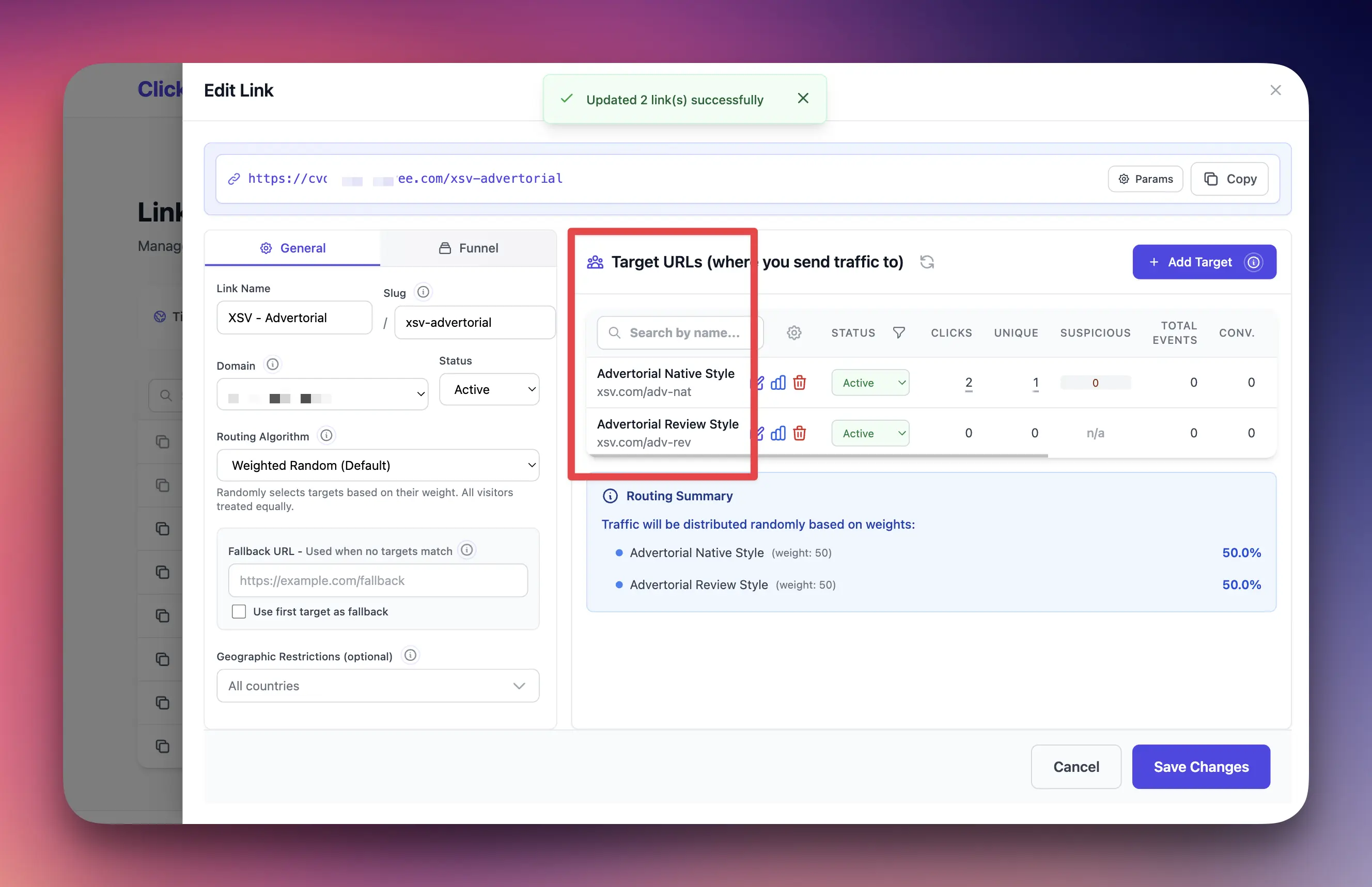
Targets are the destination URLs where you want to send your visitors. Each tracking link can have one or more targets.
Key points about targets:
- A link needs at least one active target to redirect traffic
- You can add multiple targets to split test different pages
- Each target can have its own weight for traffic distribution
- Targets can have geo-targeting rules (country-specific)
- You can track conversions at the target level
3. Rotation Algorithms
When a link has multiple targets, ClickerVolt uses a rotation algorithm to decide which target to show each visitor. Available algorithms:
- Weighted Random: Random selection based on target weights (percentages). Visitors can see the same target multiple times.
- Sequential: Cycles through targets in order using a global counter (1→2→3→1...). Visitors can see the same target multiple times.
- Sequential Unique: Uses global sequential counter, but each visitor can only see each target ONCE. Falls back if visitor has seen all targets.
- Only Uniques: Random weighted selection from targets visitor hasn't seen yet. Falls back if visitor has seen all targets.
- Progressive Exposure: Time-based per-visitor progression. Shows each target for X days (configurable), then advances to next. Also advances to next if visitor has converted on current target. Can loop or fallback after completion.
The default and most commonly used algorithm is Weighted Random, which is perfect for split testing multiple offers.
4. Conversion Tracking
Conversion tracking lets you measure sales, leads, signups, or any other valuable action. ClickerVolt supports multiple tracking methods:
- JavaScript Tracking: Place a script on your thank-you/confirmation page
- Affiliate Network IPNs: Automatic tracking from ClickBank, JVZoo, WarriorPlus, etc.
- Custom Events: Track up to 10 custom events (add to cart, video views, etc.)
With conversion tracking, you can calculate your ROI, conversion rate, and earnings per click (EPC).
5. Statistics and Analytics
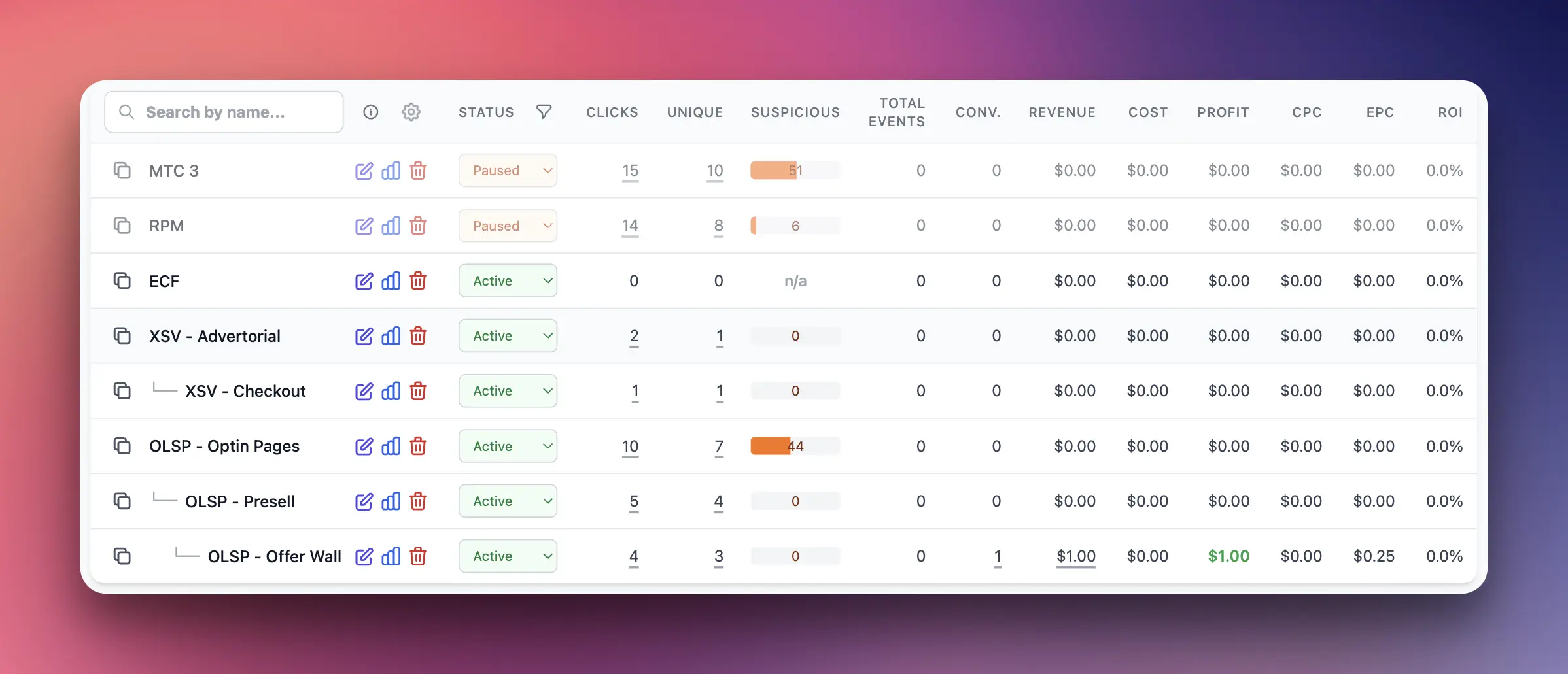
ClickerVolt provides detailed analytics on your traffic and conversions:
- Total clicks and unique clicks
- Conversions and conversion rate
- Revenue and ROI
- Geographic breakdown by country
- Device and browser statistics
- Referrer information (where traffic came from)
- Time-based trends and patterns
All statistics are updated in near real-time (usually within seconds).
6. Funnels
A funnel is a series of connected tracking links that represent your customer journey. For example:
- Step 1: Ad Click → Pre-sell Page (Link 1)
- Step 2: Pre-sell Page → Sales Page (Link 2)
- Step 3: Sales Page → Upsell Page (Link 3)
By connecting links into a funnel, you can track how visitors move through each step and identify where they drop off.
7. Custom Domains
Instead of using ClickerVolt's default domain, you can use your own custom domain for tracking links. Benefits include:
- Professional, branded links
- Better trust from visitors
- Avoiding link shortener blocks on some platforms
- Multiple domains for different campaigns or clients
Custom domains require DNS configuration and have a monthly fee of $4 per domain.
How Everything Works Together
Here's a typical workflow:
- You create a tracking link with a unique slug
- You add one or more target URLs (where visitors will go)
- You choose a rotation algorithm if you have multiple targets
- You copy your tracking link and use it in your ads, emails, or social posts
- Visitors click your tracking link
- ClickerVolt tracks the click and redirects to a target
- You view real-time statistics in your dashboard
- If conversion tracking is set up, conversions are recorded automatically
- You analyze the data and optimize your campaigns
Advanced Topics
Visitor Identity and Fingerprinting
ClickerVolt uses advanced browser fingerprinting to accurately identify unique visitors, even if they clear cookies or use private browsing. This ensures accurate statistics and prevents duplicate conversions.
Bot Detection
ClickerVolt automatically detects and flags bot traffic using a combination of:
- Browser fingerprinting analysis
- Known bot user agents
- Suspicious behavior patterns
- IP address reputation checks
Bot traffic is excluded from unique visitor counts and can be filtered in reports.
Credit System
ClickerVolt uses a credit-based system for billing. Each event (click, conversion, or custom event) consumes 1 credit. You can:
- Purchase credits as needed
- Set up auto-reload to automatically buy credits when balance is low
- Get free credits for referring new users
Credits expire after 30 days if unused, encouraging active usage.